MyTurn is queue and appointment software for barbershops. It does one job completely: who is waiting, who is next, and who is with which barber — from the moment someone walks in to the review they leave afterwards.
The problem it solves
A busy shop without a system runs on memory and goodwill. Clients stand near the door because nobody can tell them how long the wait actually is. Someone leaves after ten minutes and you never find out they were there.
Barbers stop mid-cut to work out who arrived first, or to answer a phone that’s ringing during someone else’s haircut. Two clients both believe they’re next. One of them is right.
None of that is a staff problem. It’s a missing system.
How MyTurn handles it
A tablet at the door takes the check-in — or the client scans a QR code and does the same thing from their own phone, without touching the tablet at all. From that second, the queue is one live list that everybody sees.
The client watches their position move on their phone. The barber sees the same list on theirs and calls the next person with one tap. Nobody has to ask, and nobody has to guess.
Four interfaces, one queue
Everyone who touches the shop gets their own screen, and all four read the same live list. Nobody re-types anything, and nobody has to ask anyone else what’s going on.
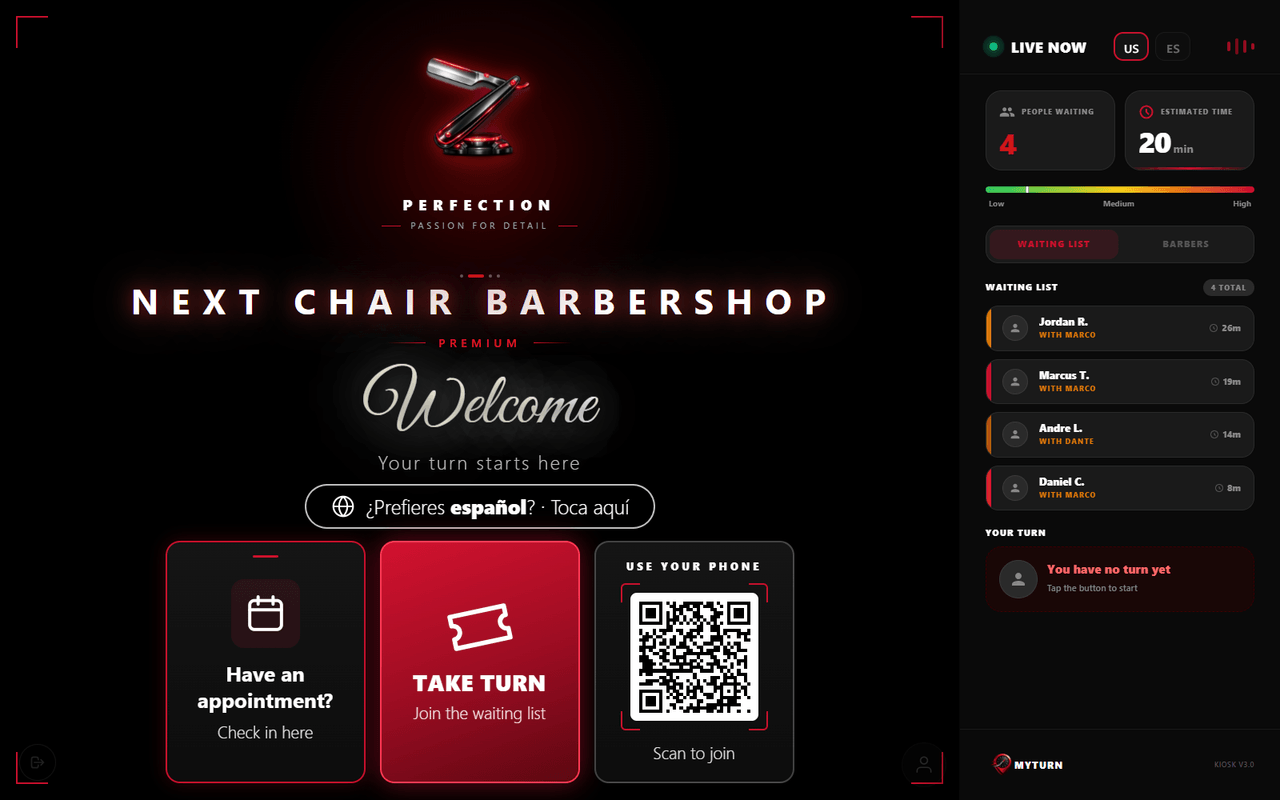
Kiosk — the client, at the door
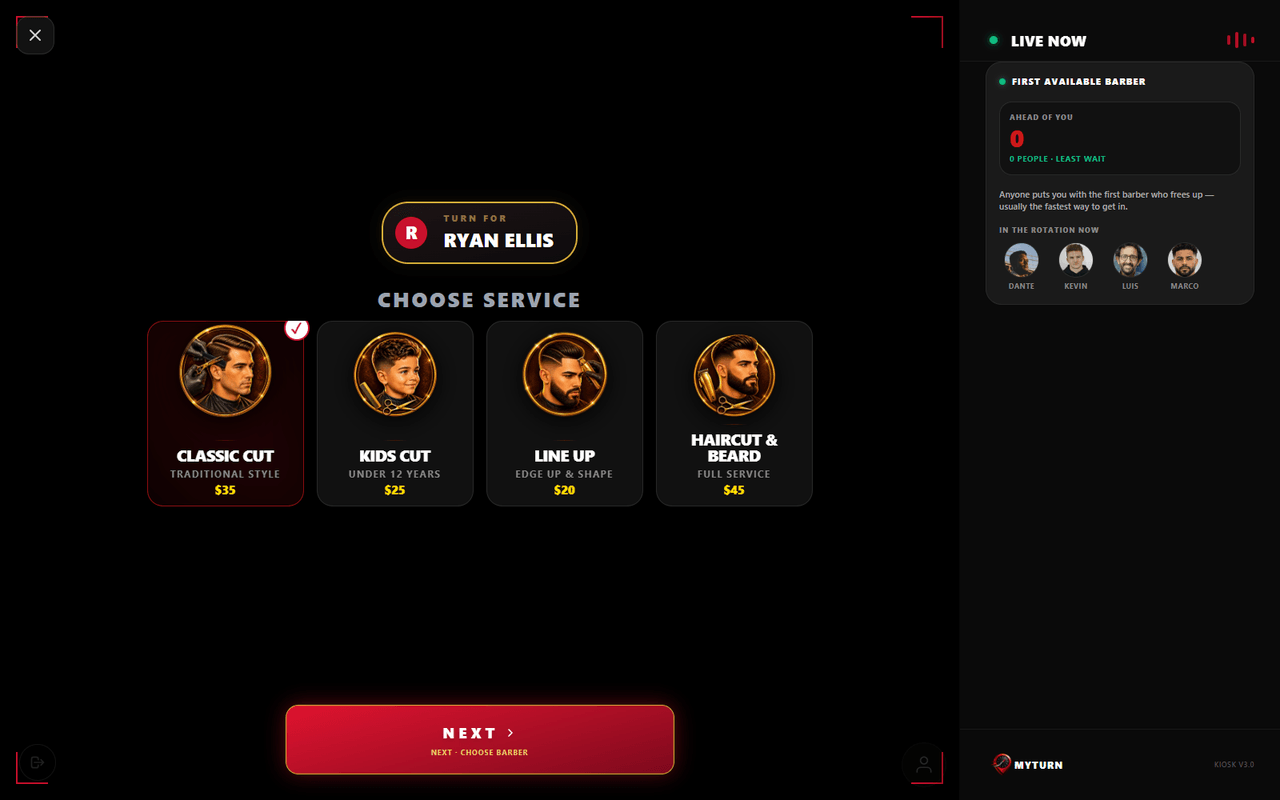
The tablet at the door is the only hardware in the whole system, and the client is the one using it. Check-in takes under a minute with nobody from the shop involved.
- Check in with a phone number — or scan the QR code and do the whole thing from your own phone, without touching the tablet
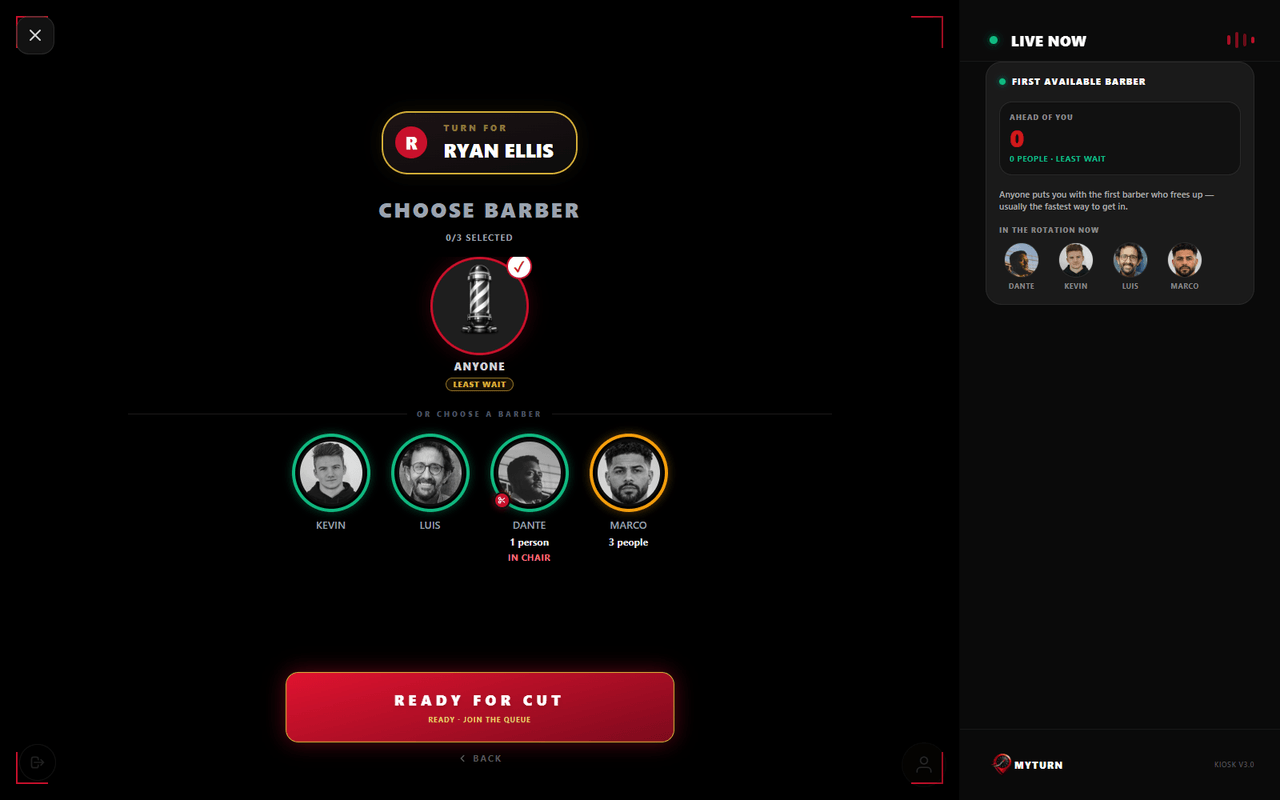
- Pick the service, then the barber: the shop’s own list, with each barber’s real photo, rating and what clients actually wrote about them
- Anyone — skip the choice and go to whoever frees up first, usually the fastest way through
- Add companions: whoever came with you joins the same queue and stays beside you in it
- Text updates are a checkbox, unticked by default — leaving it unticked changes nothing about your place in line
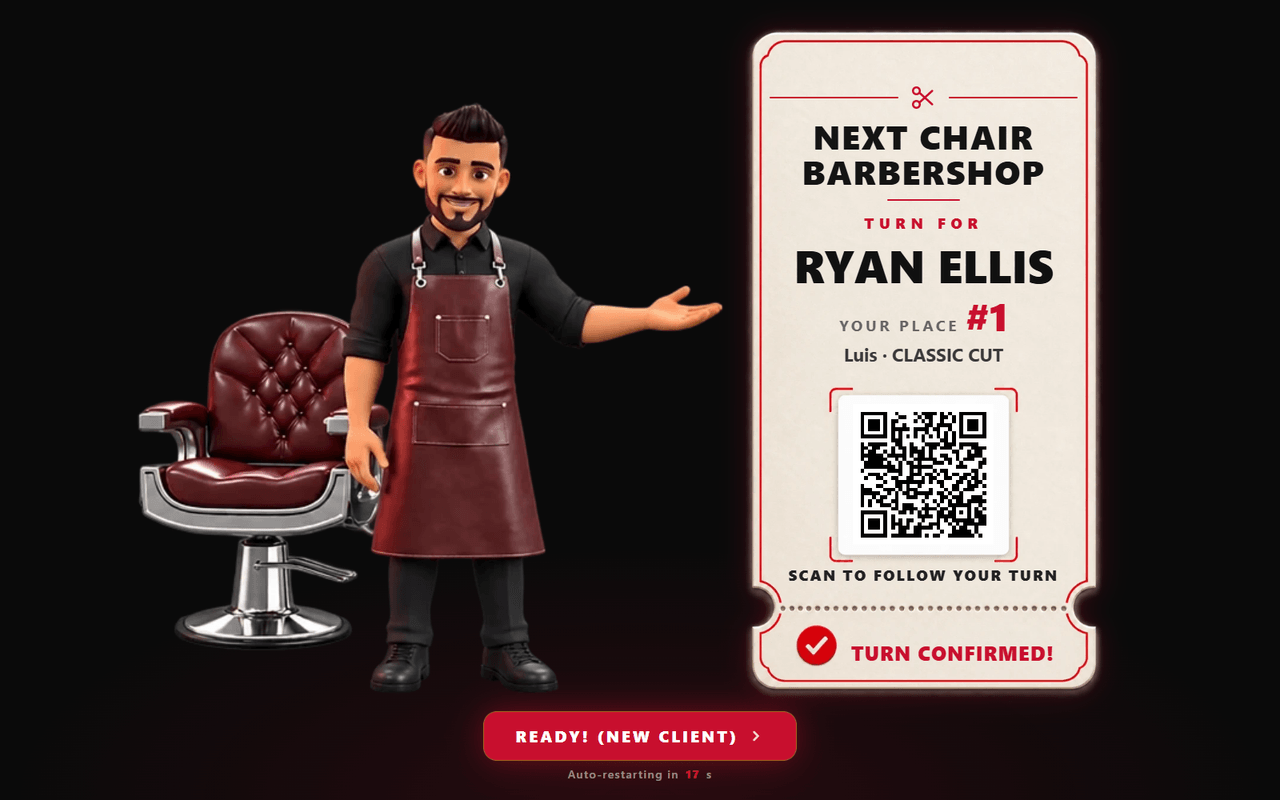
- A ticket at the end: their place in line, their barber, and a QR code that takes the turn to their phone
- English and Spanish, switchable on the welcome screen
Client app — the client, on their own phone
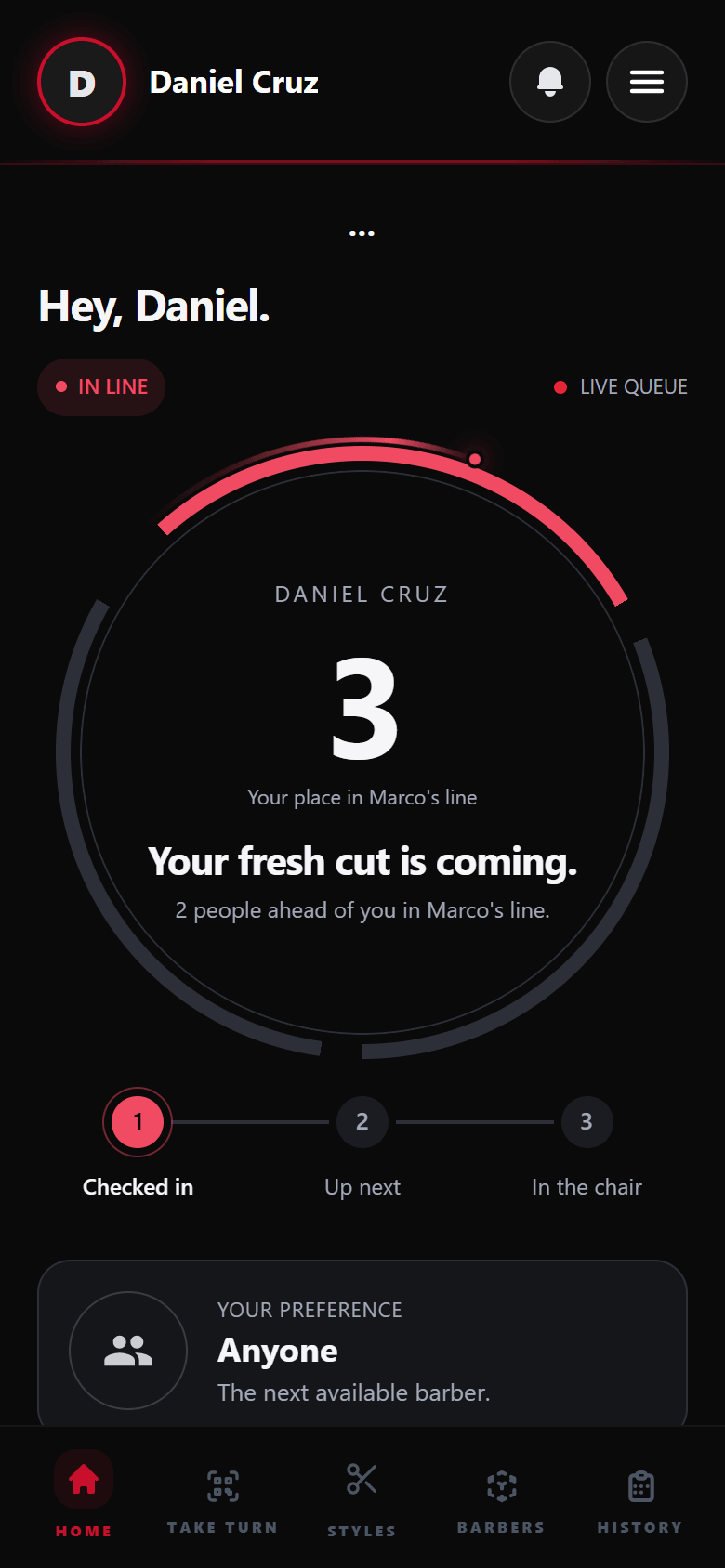
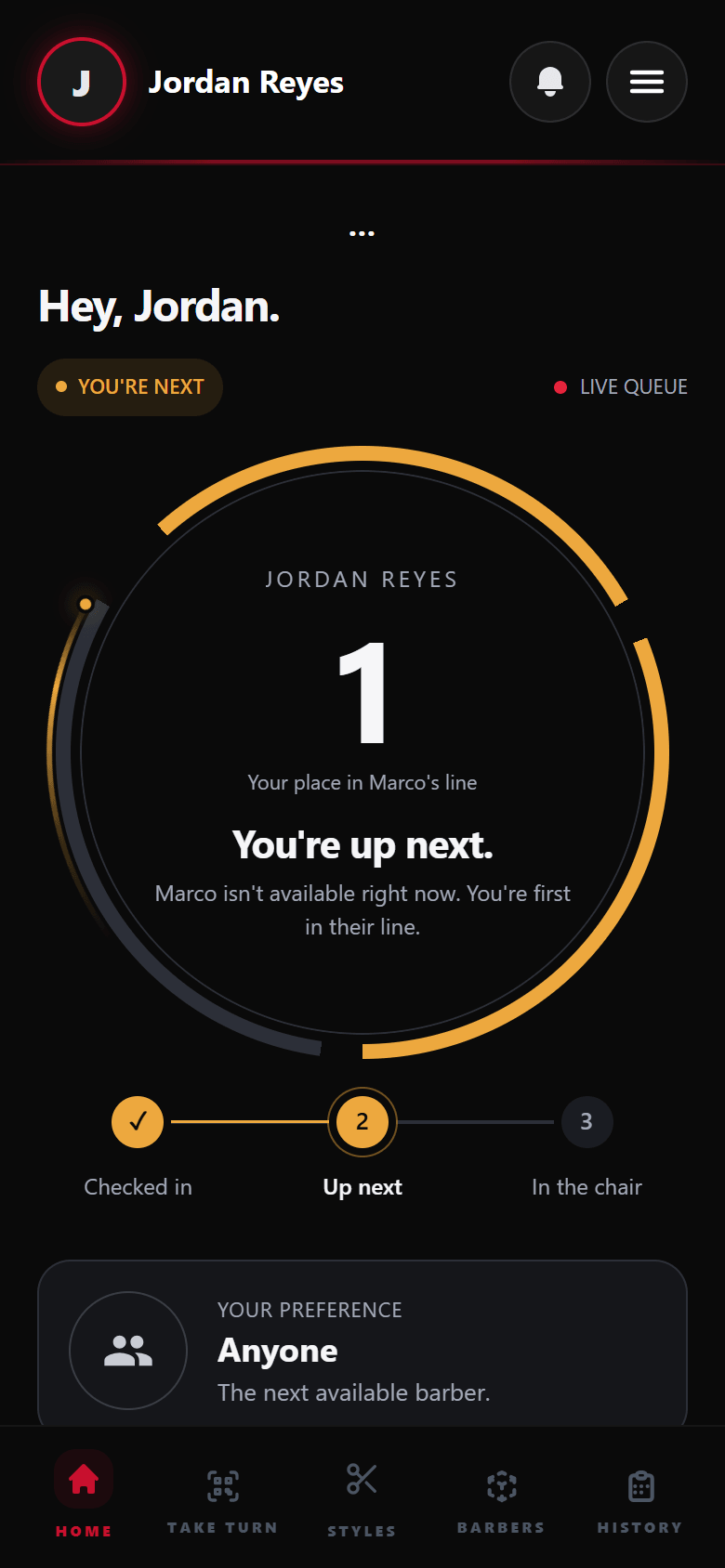
After check-in the phone becomes the ticket. It’s a web page, not a download: it opens from the QR code at the kiosk, and it keeps itself current.
- Position in the queue, updating on its own — nothing to refresh
- Estimated wait and how many people are ahead (a shop can show the count instead of a time)
- Which barbers are working right now, who’s free and who’s busy
- The client’s own history: past visits with barber and service
- Book an appointment from the link their barber sends: pick the day and time, and reschedule from that same link
- A review prompt after the cut — and those ratings are exactly what the next client reads at the kiosk
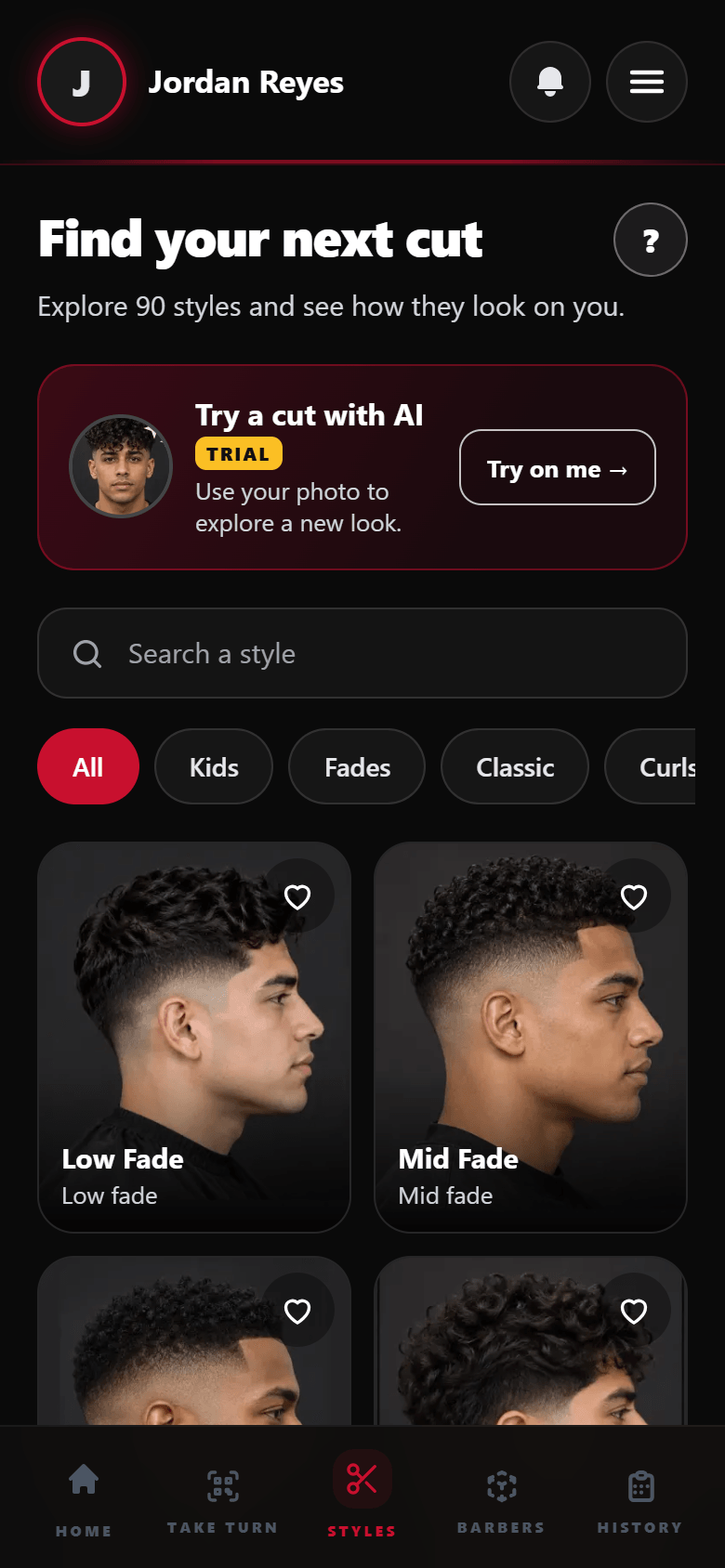
- Styles — in shops that turn it on, a catalog of 90 cuts to browse while they wait, each from the front, side and back, saved to Favorites to show the barber
- Nothing to install and no account to create: the phone number is the account
Staff dashboard — the barber, on their own phone
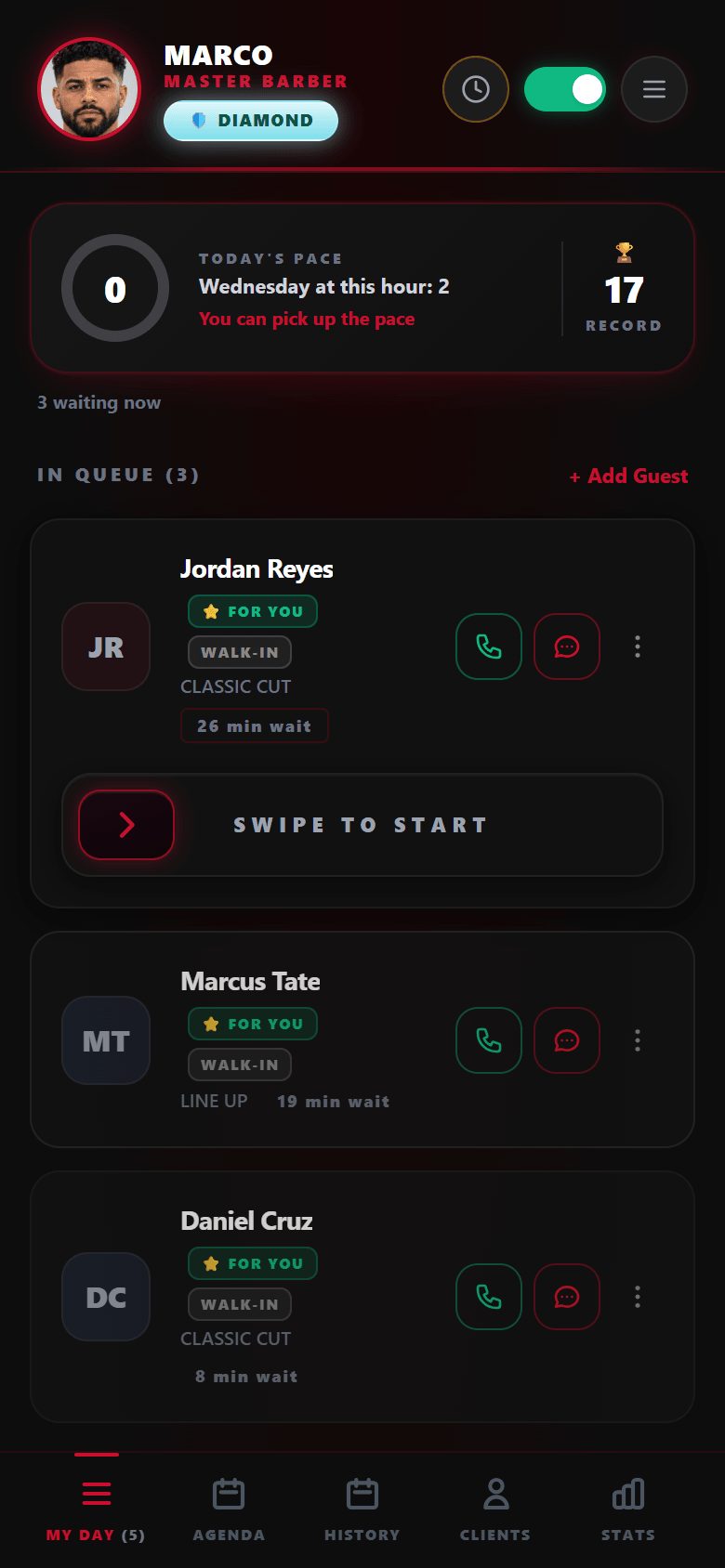
One screen for the whole shift. The barber never reconciles two lists: walk-ins and booked appointments arrive already merged, in the order they should be served.
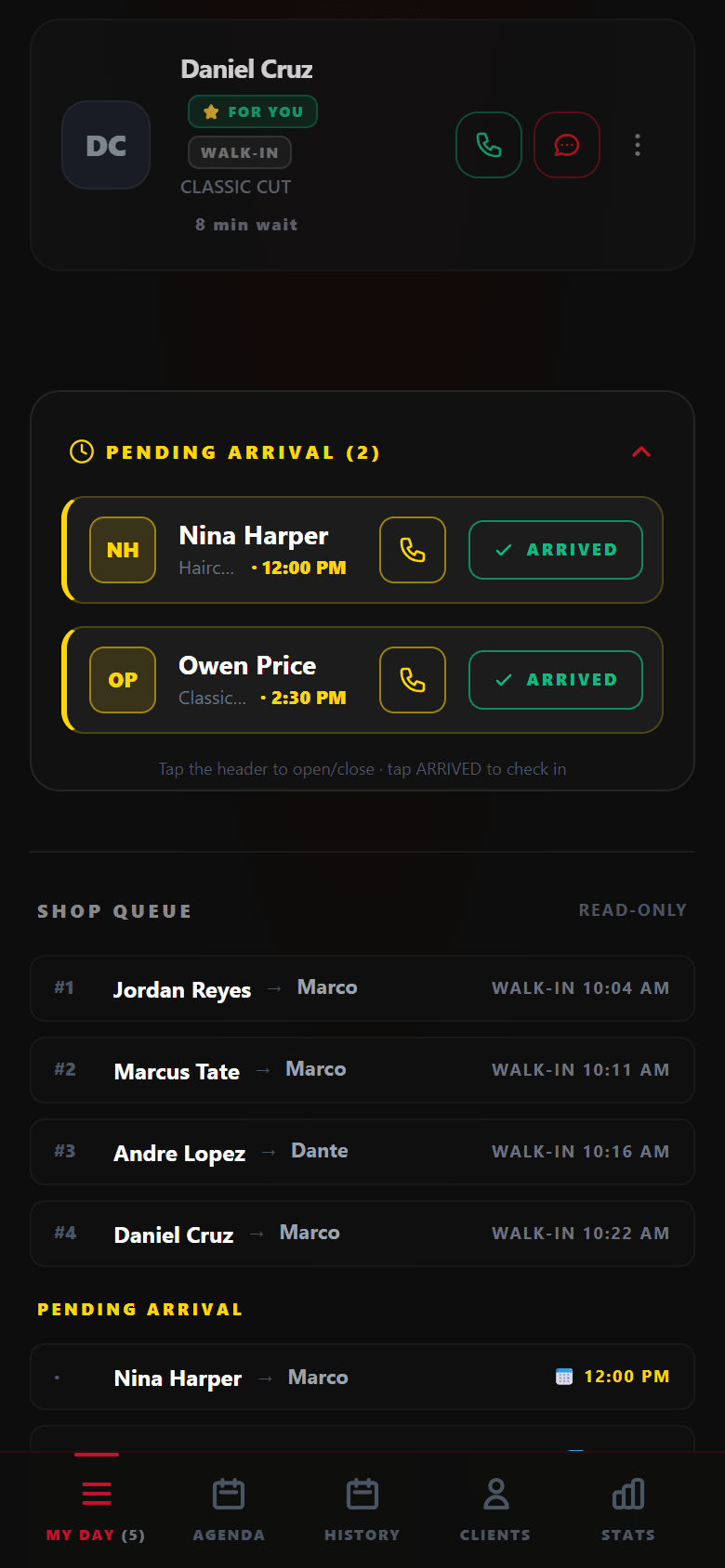
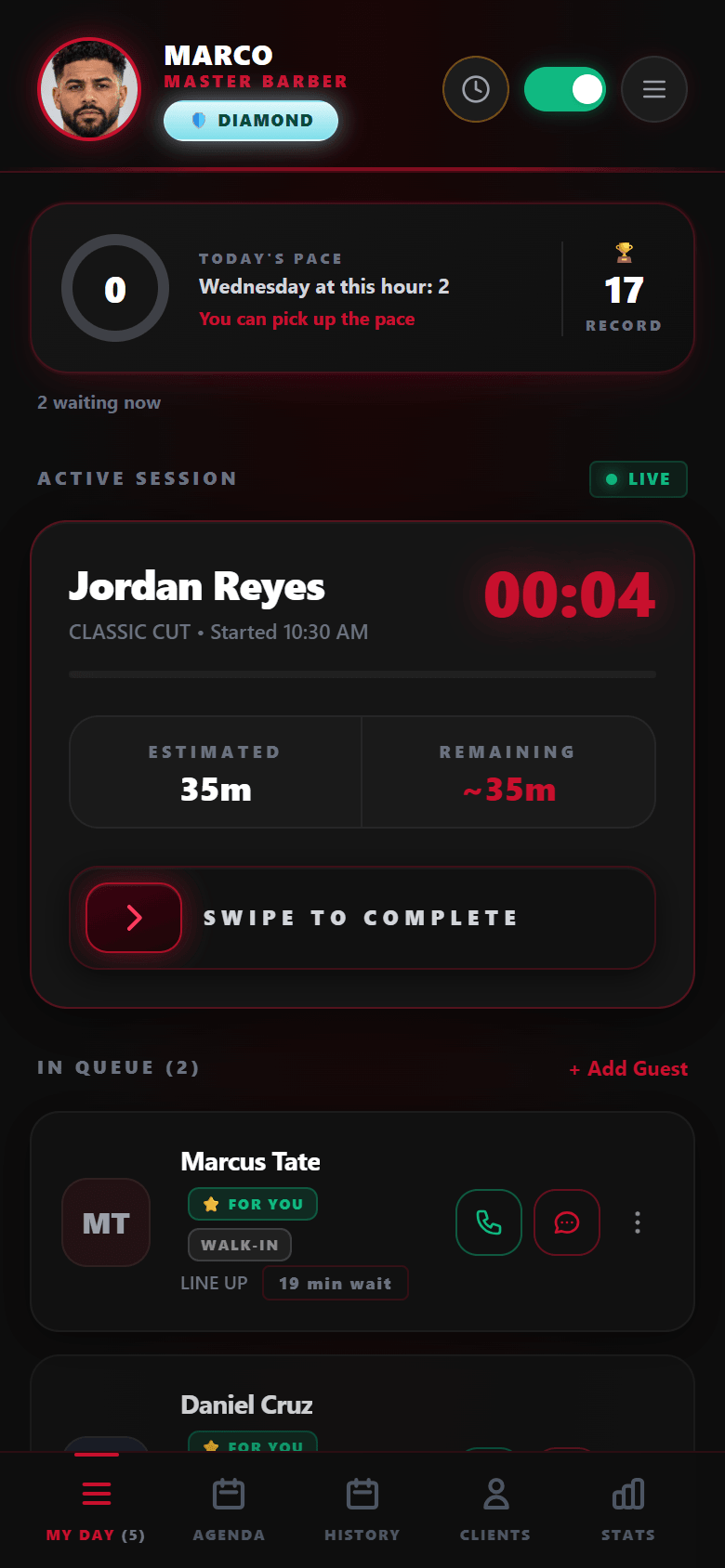
- My day — everyone waiting for this barber, in order: the service, how long each person has waited, and a button to call or text them. Swipe to start, swipe to complete. Appointments on their way show up below, ready to mark as arrived
- Shop queue — where the shop turns it on, the whole shop’s line in one read-only list, so a barber knows what’s coming before it reaches them
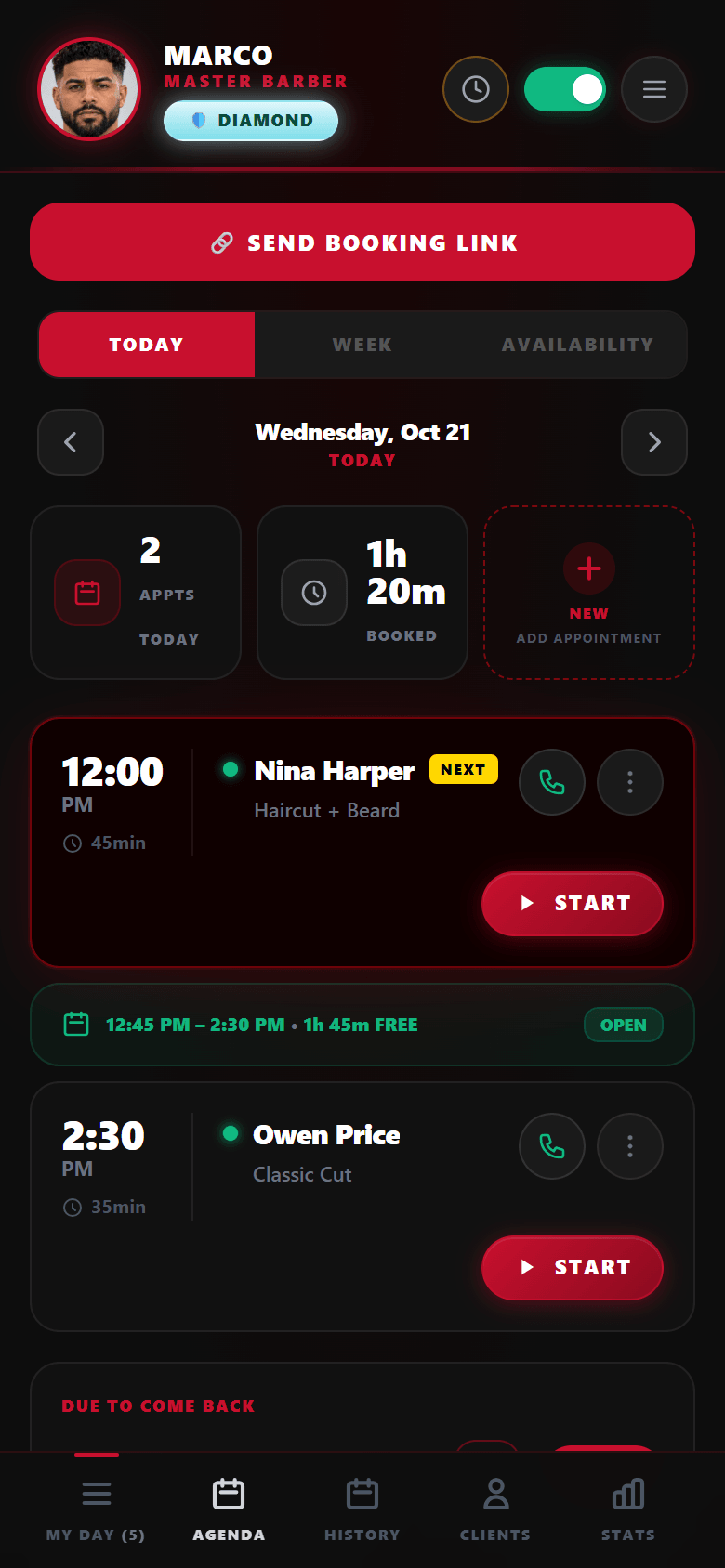
- Agenda — the day’s appointments, and booking new ones
- Clients — everyone that barber has served, grouped by family when they share a phone. Open one before they sit down and see their history
- Rotation — the Anyone queue and where this barber stands in it
- Stats — their own numbers: cuts today, this week, this month
- Availability is theirs to run: an on/off switch, QR or location check-in where the shop requires it, and “running late” or “on break” states
Admin panel — the owner, in any browser
The owner’s panel answers the two questions an owner actually has: what happened, and who did it. It opens in a browser — there’s nothing to install and it isn’t tied to the tablet.
The day, live. Cuts today against yesterday, appointments done versus pending, who’s in a chair, who’s online, who’s waiting, and a chair map with each barber’s photo. Plus whether the tablet at the door is actually online right now.
Reports. One period selector — day, week, month, year — that moves every block at once:
- Cuts in the period, with the daily curve
- Walk-ins versus appointments, side by side
- Hourly traffic, with the peak and the quietest hour called out
- Barbers ranked by cuts, and services ranked by volume
- Turns that closed automatically, when someone forgot to swipe
Performance. Average time per cut, broken down by barber and by service, fastest highlighted — so “who’s quick at a line-up” stops being an opinion. Plus QR adoption: how much of the month’s queue came in by QR instead of the tablet, against last month.
Clients. Everyone the shop has ever served, in three views:
- Total registered, new this month, and the shop’s average rating
- Return rate, and how many of the previous period’s new clients came back — broken out per barber
- Segments that sort themselves: VIP, frequent, new, at-risk, lost, inactive
- Visit origin: kiosk, QR or appointment
- An at-risk list with one-tap call and CSV export
- Open any client for their visits, how often they come, their usual barber, their whole cut history, their reviews, and a private notes field only the shop sees
Every barber’s file. Open any barber for their cuts today, this week, this month and this year, their performance by specialty, their rating and the reviews clients left them. This one is a record to read, not a console: per-barber settings aren’t configured from here — tell us what you need changed and we do it.
The queue itself. The owner isn’t only watching: they can reassign a waiting client to another barber, take someone out of the queue, and read the skip log — who was skipped, when, and the reason the barber gave.
Setup. Services and prices, opening hours, shop information, the kiosk PIN, and the kiosk’s own welcome screen — up to eight slides with your own images, your own titles, and one marked as the shop logo.
Subscription. Plan, seats and billing, with the prorated amount shown before you confirm, and the Stripe billing portal for invoices and payment method.
What MyTurn is not
Worth being clear about the edges, because the wrong tool is expensive. None of this is about visibility — the owner sees the whole shop, above. It’s about where the product stops.
Not a POS
MyTurn never touches money. Clients don’t pay, tip or check out through it, and it doesn’t open a register or print a receipt.
Not inventory
No products, no stock, no supplier orders.
Not payroll
It counts every cut, per barber, by day, week, month and year — and stops there. It doesn’t turn that into commissions or paychecks. Export the numbers; your accountant does the rest.
Not a marketing platform
No campaigns and no promotional blasts. The only messages it sends a client are about that client’s own turn.
If your shop already runs its money through something else, MyTurn sits beside it and doesn’t ask to replace it.
Where we’re going
Two things on this page aren’t finished, and they’re the two we care most about. Both are hard for the same reason — a haircut isn’t a fixed unit of time — and we’d rather say so than let a demo imply otherwise.
A wait time you can trust
If the app says ten minutes, we want it to be ten minutes. It isn’t there yet, and the reason is simple: the same service takes a different amount of time depending on the barber, the client and the day. A fixed number per service — what most systems use, and what we still fall back on — is wrong for almost everybody.
The learning part is already running. Every completed cut is recorded with its real duration, per barber and per service, and where a barber has enough history the shop’s own dashboards already use those measured times instead of the configured ones. It takes around ten cuts of a service before a barber’s real average is worth trusting, and more before the system can tell that one particular client always takes longer than the rest.
What’s left is the part the client sees. The estimate on someone’s phone still leans on the configured duration more than on the measured one. Closing that gap — so the number on the client’s phone is the number the shop’s own history already knows — is what we’re working on next.
Knowing someone left, while it still matters
Today, if a client gets tired of waiting and walks out, the system finds out overnight: a turn still marked as waiting when the day changes gets closed as a no-show. That’s accurate for the record and useless in the moment.
The goal is for the owner to know while they can still do something — a name that’s been waiting well past their estimate, flagged on the panel that same afternoon instead of showing up in tomorrow’s numbers. Every walkout is a client the shop lost without a chance to react, and right now the only way to catch one is for somebody to happen to notice.
Both are in progress and neither has shipped. When they do, they’ll move up into the sections above — not stay in this one.